Dashboard
The dashboard is displayed after login. The dashboard provides menus and links to quickly access components within the Web Client.
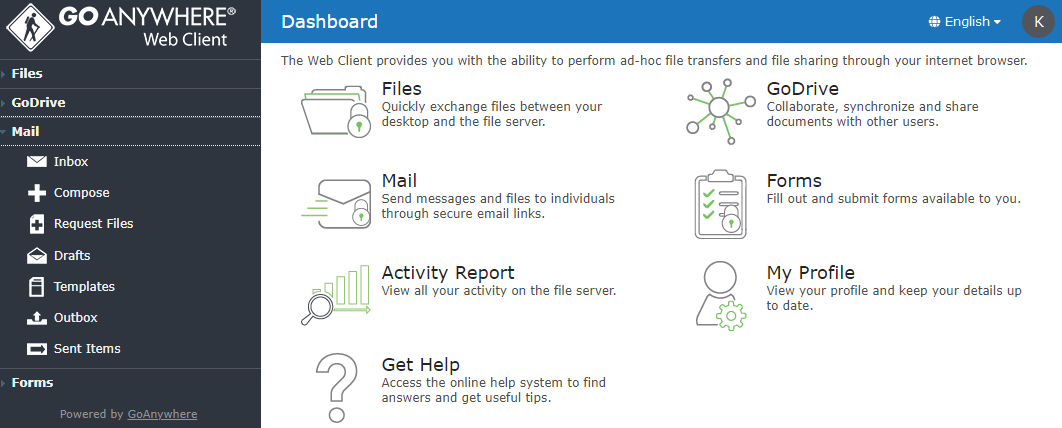
Side Menu
To access a component, select it from the side menu.
Quick Links
Launch popular components by clicking a corresponding Quick Links icon.
|
Icon |
Component Description |
|---|---|
|
|
Files provides browser access to authorized files and folders on the server. Files can be transferred quickly between the desktop and server over HTTPS protocol. Since files in are stored on a standard file system, they can be directly accessed by backend applications and programs. |
|
|
GoDrive is a secure file system that provides Enterprise File Synchronization and Sharing (EFSS) services. With GoDrive, files and folders can be easily shared between users with advanced collaboration features including file revision tracking, commenting, trash bin, media viewing and synchronization with Windows devices. |
|
|
Mail allows you to send messages and files as secure "packages" on an ad-hoc basis. Recipients will get an email with a unique link to each package, allowing them to download the message and files through a secure HTTPS connection. This is a great alternative to regular email since there are no file size or file type restrictions. |
|
|
Form allows you to complete custom forms and survey's created by administrators. |
|
|
View all audit activity for your user account including logins, logouts, file uploads and downloads. |
|
|
View your profile and keep your details up to date. |

|
Having an issue? Consult this help system to get the answers you need. |


Language
If more than one language option is enabled by an administrator, those language options will appear in the drop-down menu.
If one or more of these components do not appear on your dashboard, then you may not have permissions to those components. Contact your administrator for assistance.